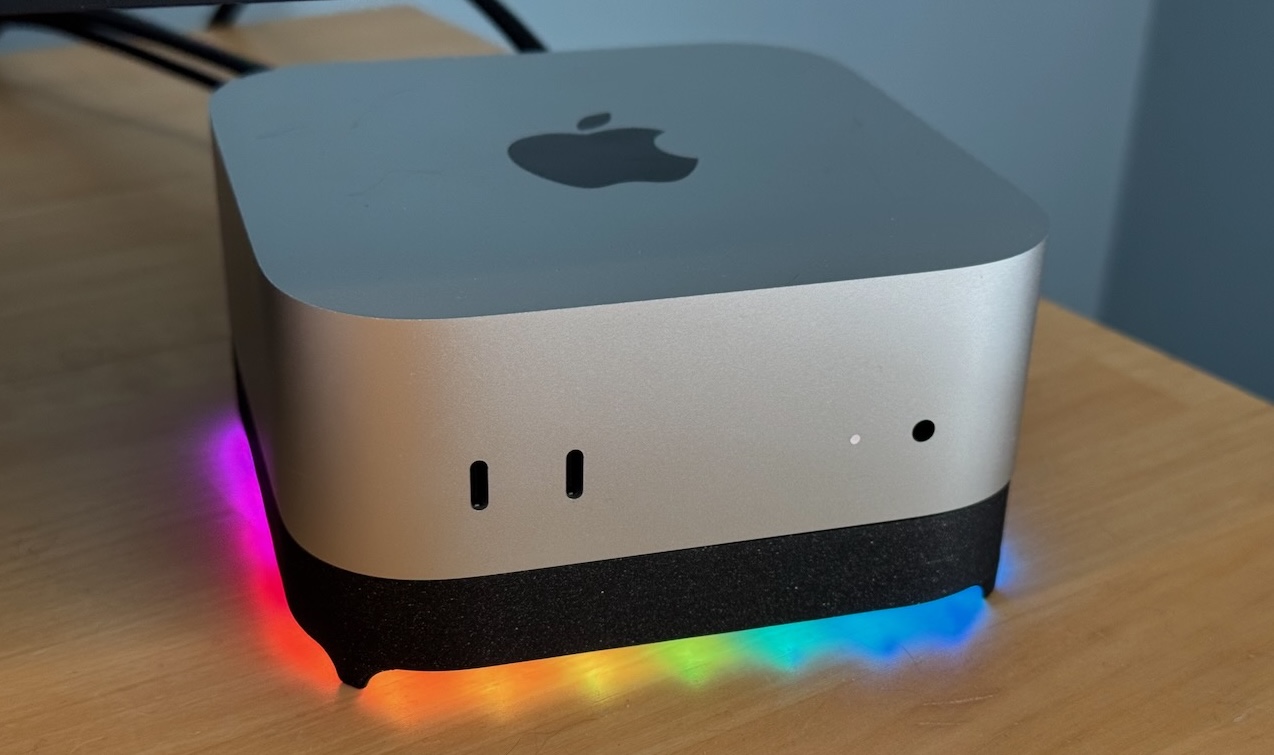
Blinkenhub sits under your Mac mini and gives it two extra USB ports, and a glow you can control from your own software.
How did this happen?
Early this year I replaced my Mac Studio with a Mac mini. It’s a great little computer, and for what I do it is a perfect balance of power and size.
While the Studio had a copious amount of ports on it’s back, the mini has exactly three. With two monitors, each plugged into its own Thunderbolt port, that left only one port for the other devices I wanted to connect. I could have used the front ports, but that’s kind of unsightly. And I have other transient uses for those ports anyway.
Complicating matters slightly, my devices, a UPS and a Space Navigator (mouse like thing) both use USB-A, which the Mac mini has eschewed entirely. Even if I had available ports, I’d need adapters, which I also don’t love. So something had to be done.
The obvious solution is to use a separate hub. But, most USB-A hubs also have a USB-A upstream connector, so besides the hub I’d still need a USB-A to USB-C adapter. And I might also need an external power supply to provide each of the downstream ports with the standard 500ma of power. Maybe I could use a hub with USB-A downstream ports, and a USB-C PD capable upstream port, but that would not solve the extra box on my desk clutter problem.
So I set out to build a hub that would sit under the Mac mini. In addition to having two USB-A downstream ports, it also uses a USB-C upstream port so it connects directly to the mini without an adapter. And, it does USB-C PD negotiation to fully power the downstream ports without needing an external power adapter.
Then I had a lightbulb (er, LED?) moment, and realized I could go one step further and put a string of LEDs around the underside of the stand that could be controlled by software on the host. Which, as it turns out, is more fun than I had originally imagined.
Thus the Blinkenhub was born.